When Chrome was launched early September, there was much hue and cry about the need for yet another web browser in an already crowded market. I thought it was a good thing. Now, it is getting better.
Adrian Kingsley-Hughes, at the Hardware 2.0 blog on ZDNet, has published some numbers on how the new Firefox 3.1 beta 1 stacks up against IE, Chrome and the rest. If Chrome set the bar high in ACID 3 and SunSpider Javascript benchmarks, Firefox 3.1 has pushed it even higher. Chrome still takes the lead in Google's own V8 JavaScript benchmark quite convincingly though.
The Firefox 3.1 beta 1 also comes with a slew of features which will hopefully inspire developers in the opposing camps to create some magic of their own. As Kingsley-Hughes puts it, competition is good.
Showing posts with label browser. Show all posts
Showing posts with label browser. Show all posts
Oct 17, 2008

Sep 10, 2008
Chrome - why another browser is good
It has been more than a week since Google unleashed Chrome on the Web. Statistics abound on the market share erosion of the incumbents from the newcomer's arrival. Frankly, I think it is far too early for the numbers to make sense. There will be enough downloads and installs in the first week as people try out the new software and figure out if it is actually any good. (Remember, it was promoted in the Google homepage, no less - the most expensive virtual real estate in the world. That has to count for something.)
So how can the new browser help the Web? In a market crowded by the likes of Internet Explorer, Mozilla Firefox, Safari and Opera, is there any need for yet another commodity software which is free anyway? I think there is.
Firstly, Google has open-sourced Chrome. This means virtually anybody can peer under Chrome's hood and take the best features and even improve upon it. Like the rising tide that lifts all boats, every browser developer and user stands to gain from this.
Secondly, I think the sandbox-approach to the whole browser and even individual tabs is an innovative move. If one site crashes your tab, just close it without bringing all the other tabs and browser windows down. (I am not sure about this, but I think only Chrome has implemented this as of now.) Spawning new processes for individual tabs keeps the user in control, and the entire system more secure.
Thirdly, Google has a way with how it puts the user in focus in product design. The clean, minimalist look of the Google homepage is appreciated by millions, and Chrome has borrowed this philosophy in its user interface. I am sure other browser designers can take a page or two from the Google design book and weave it onto their own. No big, bloated buttons and no useless menu bars. Keep it simple, silly.
There are many things that I don't like at all about Chrome, but that will form the topic of another post. But if somebody has ideas for yet another Web browser and intend to release one soon, I am all for it. Better too many than too few.
So how can the new browser help the Web? In a market crowded by the likes of Internet Explorer, Mozilla Firefox, Safari and Opera, is there any need for yet another commodity software which is free anyway? I think there is.
Firstly, Google has open-sourced Chrome. This means virtually anybody can peer under Chrome's hood and take the best features and even improve upon it. Like the rising tide that lifts all boats, every browser developer and user stands to gain from this.
Secondly, I think the sandbox-approach to the whole browser and even individual tabs is an innovative move. If one site crashes your tab, just close it without bringing all the other tabs and browser windows down. (I am not sure about this, but I think only Chrome has implemented this as of now.) Spawning new processes for individual tabs keeps the user in control, and the entire system more secure.
Thirdly, Google has a way with how it puts the user in focus in product design. The clean, minimalist look of the Google homepage is appreciated by millions, and Chrome has borrowed this philosophy in its user interface. I am sure other browser designers can take a page or two from the Google design book and weave it onto their own. No big, bloated buttons and no useless menu bars. Keep it simple, silly.
There are many things that I don't like at all about Chrome, but that will form the topic of another post. But if somebody has ideas for yet another Web browser and intend to release one soon, I am all for it. Better too many than too few.
Dec 2, 2006
Opera Mini 3 - Mobile web unleashed
Study after study proclaims the arrival of the Mobile Web, information on the go and being "always connected". The few who have actually explored the Web on our mobile devices would know better that things are not all that great right now. Clumsy browsers trying hard to fit Web pages on the small screen, slow download speeds and the worst of all, the exorbitant charges for data usage by mobile operators.
Opera Mini 3
Opera Software, the makers of the popular desktop Web browser, have announced the latest version of their browser for Mobile phones, Opera Mini 3. Opera Mini is a Java application that can be installed on most of today's smartphones or mobile devices supporting Java.
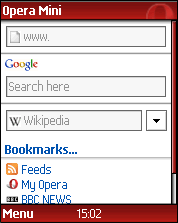 Unlike traditional mobile browsers like Opera's own Opera Mobile and Symbian browser, the Mini does not connect to the concerned web server directly. Instead, it connects to a proxy server that fetches the requested page and reformats the original HTML, Javascript and multimedia content into a format optimised for mobile phones. Thus, when you type www.yahoo.com in the address bar, the application relays it to the proxy. The proxy then fetches the Yahoo! homepage, strips it off all the bells and whistles, optimises for your specific device and sends it to the application. All the app has to do is take this and render on the screen, a much easier task when the heavy objects are taken off.
Opera Mini 3
Opera Software, the makers of the popular desktop Web browser, have announced the latest version of their browser for Mobile phones, Opera Mini 3. Opera Mini is a Java application that can be installed on most of today's smartphones or mobile devices supporting Java.
 Unlike traditional mobile browsers like Opera's own Opera Mobile and Symbian browser, the Mini does not connect to the concerned web server directly. Instead, it connects to a proxy server that fetches the requested page and reformats the original HTML, Javascript and multimedia content into a format optimised for mobile phones. Thus, when you type www.yahoo.com in the address bar, the application relays it to the proxy. The proxy then fetches the Yahoo! homepage, strips it off all the bells and whistles, optimises for your specific device and sends it to the application. All the app has to do is take this and render on the screen, a much easier task when the heavy objects are taken off.
 The killer utility
What makes Opera Mini so useful is that it cuts out the data consumption drastically, since the proxy has filtered out most of the unwanted content already, making the pages much lighter. Some reviews claim to have observed 70-80% reduction in the data consumption, which can be extremely useful considering the exorbitant charges levied by mobile operators. Thus, even if the webpage is not optimised for your mobile device, you can expect Mini to step in and do the dirty work for you.
The standard homepage of the browser carries a Google searchbox, and a customisable search engine containing sites like Wikipedia and Dictionary.com. RSS feeds are also supported, and so is photo blogging that helps you blog from your phone to the Opera Community server. The scroll feature is really user-friendly and keyboard shortcuts are really a breeze.
Mobile web proxies
If your phone doesn't support Java and you can't install Mini, you can still use other mobile web proxies to reduce your data usage. A good one is Google Mobile service, available at www.google.com/xhtml. Enter the site name or URL in the Google Mobile search box and click on the relevant link. Google Mobile uses a proxy server to interpret the target webpage into a format more suited for mobile devices, although you can't really compare it with the Mini's performance. But then again, that was not what it was designed to do. It is a search again, after all. For browsing on mobile devices however, I highly recommend getting the Mini. Goto operamini.com on your mobile and install the app. The Web is truly mobile now.
Subscribe to:
Posts (Atom)